
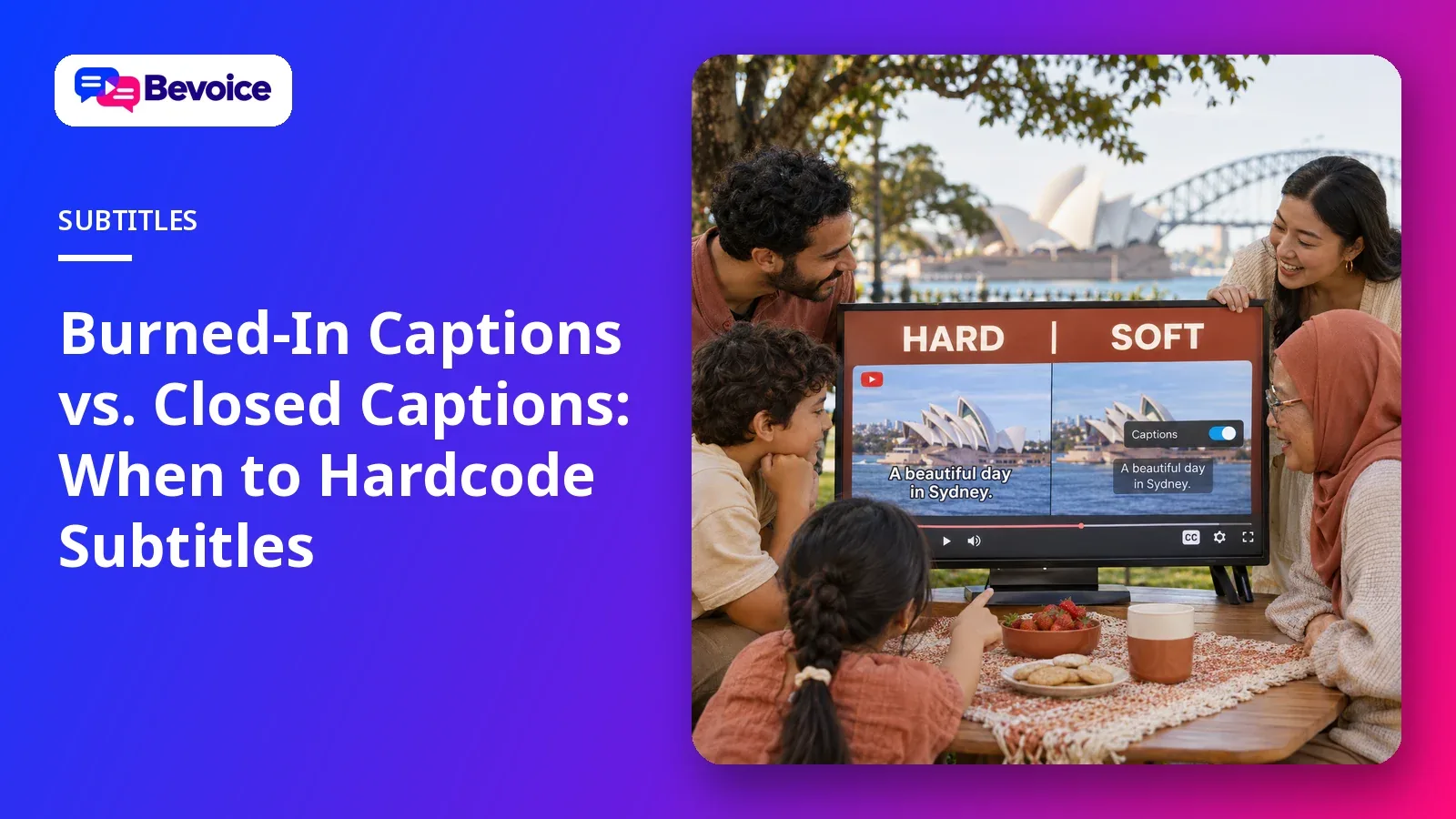
Burned-in captions (also called open captions or hardsubs) are permanently rendered into the video image itself, so they appear on every screen without the viewer touching a setting. Closed captions (soft subtitles) travel in a separate text track such as SRT or VTT, letting viewers turn them on or off, switch languages, or rely on assistive screen readers.
Choosing the wrong option can hurt your reach or create extra rework. Hardcode captions when you need guaranteed typography on social feeds or displays that ignore subtitle tracks; use closed captions when accessibility, multi-language support, or search indexing matters most.
Burned-In Captions vs. Closed Captions at a Glance
Before deciding how to export your next video, compare how burned-in captions and closed captions behave across playback, editing, and distribution:
| Feature | Burned-In Captions (Open / Hardsub) | Closed Captions (Soft Subtitles) |
|---|---|---|
| How they are stored | Rendered directly into video pixels | Separate track or sidecar file (.srt, .vtt) |
| Viewer control | Always visible; cannot be hidden | Viewer can toggle on/off or change size |
| Visual styling | 100% consistent fonts, colors, and outlines | Controlled by the video player or browser |
| Accessibility | Readable visually, but invisible to screen readers | Full support for assistive tech and customization |
| Search & SEO | Not crawlable as text by platforms | Indexed by YouTube and web search engines |
| Fixing a typo | Requires re-rendering and re-uploading the video | Edit the text file and re-upload in seconds |
| Multi-language support | One language per video file | Multiple language tracks on one video |
| Best for | Short-form social clips, ads, digital signage | YouTube, online courses, webinars, web players |
What Are Burned-In Captions (Open Captions)?
Burned-in captions are flattened into every frame during video encoding, just like a title card or watermark. Once exported, the words are part of the MP4 image rather than a separate data layer.
Creators and marketers rely on hardcoded subtitles whenever they want complete control over how text looks on screen. Because the video player does not have to parse a caption file, your exact font choice, background box, outline, and screen position stay identical across iOS, Android, desktop browsers, and smart TVs.
The tradeoff is permanence. Viewers cannot turn burned-in captions off if they find them distracting, and if you spot a misspelled name after publishing, you have to fix the project, re-export the entire video, and upload a fresh file.
What Are Closed Captions (Soft Subtitles)?
Closed captions are stored separately from the video stream, either as an external sidecar file (such as .srt or .vtt) or muxed as a selectable track inside a container like MP4 or MKV. If you are unsure which sidecar format a platform expects, see our comparison of SRT vs VTT vs ASS subtitle formats.
Because closed captions remain plain text until playback, they offer four major advantages:
- Accessibility compliance: Screen readers, braille displays, and platform accessibility settings can read the text, adjust font size, or change contrast for viewers with hearing or visual needs.
- Multi-language switching: You can attach English, Spanish, Japanese, and French tracks to a single video upload instead of exporting four separate MP4 files.
- Fast edits: Correcting a typo or adjusting a timestamp takes seconds because you only replace the lightweight subtitle file.
- Better discoverability: Platforms like YouTube can index your closed-caption text to understand what your video covers, as outlined in YouTube's help guide on adding subtitles and captions.
When to Hardcode Subtitles vs. Use Closed Captions
Instead of picking one method for everything, match your caption type to how and where your audience watches.
When to Use Burned-In Captions
- Short-form social feeds (TikTok, Instagram Reels, YouTube Shorts): Viewers often scroll with sound muted, and auto-generated platform captions can vary in style or fail to load cleanly on every device.
- Paid video ads and LinkedIn feed videos: Consistent, high-contrast typography grabs attention in the first two seconds without relying on a viewer tapping the CC button.
- Messaging apps and embedded players: When a video is shared directly in Slack, WhatsApp, or an older CMS player that strips external subtitle tracks, hardcoded captions guarantee the message still lands.
- Public screens and event displays: Trade show loops, waiting-room monitors, and retail kiosks usually run muted with no remote control handy to toggle captions on.
When to Use Closed Captions
- YouTube long-form videos: Viewers expect a clean video frame with a CC toggle, and closed captions avoid covering lower-third graphics or conflicting with YouTube's own player controls.
- Online courses and training portals: Students may want to toggle captions off when taking notes, switch between languages, or search transcript text.
- International audiences: If you plan to localize a video for multiple regions, closed captions let every viewer pick their preferred language on the same video URL.
- Public-sector, education, and enterprise libraries: Accessibility standards generally require selectable, machine-readable closed captions rather than text flattened into pixels.
Common Mistakes When Exporting Captions
Most caption headaches come from small workflow oversights rather than the format itself. Watch out for these four pitfalls:
- Putting burned-in text inside platform UI zones: On vertical 9:16 videos, TikTok, Reels, and Shorts place account names, descriptions, and action buttons over the bottom and right edges. Keep hardcoded captions in the upper-middle or safe center-lower zone so buttons do not cover your words.
- Burning in unedited auto-captions: Automated speech recognition can misspell brand names, technical jargon, or speaker names when audio is noisy. Always proofread your lines before rendering—for a practical checklist, read our guide on how to transcribe a video to text accurately.
- Using low-contrast text: Thin white text with no outline disappears over bright outdoor footage. Add a dark outline, subtle drop shadow, or semi-transparent background box before exporting.
- Stacking closed captions on top of burned-in captions: If you upload a hardcoded MP4 to YouTube and also enable auto-captions, viewers who have CC turned on will see two sets of overlapping text.
How to Export Both Closed and Burned-In Captions From One Project
You do not have to build two separate timelines to get both formats. If you need a fast way to add subtitles to a video automatically, Bevoice handles both soft subtitle files and burned-in MP4 exports in one place.
Upload a video or audio file up to 2 GB (MP4, MOV, MKV, WEBM, MP3, WAV, M4A, FLAC, or OGG) or paste a YouTube link. AI speech recognition detects the spoken language across 30+ languages and splits lines by natural speech rhythm, roughly one to six seconds per cue. From the editor, you can fix any name or technical term, translate into 30+ languages, and customize font size, color, background, outline, and screen position.
When your captions look right, download clean SRT, VTT, ASS, or bilingual subtitle files for YouTube and course platforms—or render a 720p or 1080p MP4 with your styled burned-in captions for social feeds. Always do a quick final review of proper nouns before publishing, and make sure you hold the rights to any video you process.
Ready to test both workflows on your next clip? Sign up for free trial credits or check Bevoice pricing to see how duration-based credits work.
Frequently asked questions
Do burned-in captions help with YouTube SEO?
No. Because burned-in captions are flattened into the video pixels, search engines and YouTube cannot read or index the words. Upload a closed-caption file such as SRT or VTT if you want your spoken keywords indexed.
Can viewers turn off burned-in captions?
No, burned-in captions are permanently part of the video image and cannot be hidden. If you want viewers to toggle captions on or off, export a closed-caption track instead.
Does burning subtitles into a video reduce video quality?
Hardcoding subtitles requires re-encoding the video file, which can slightly soften sharpness if you use a low bitrate. Exporting from your clean master file at 720p or 1080p with a solid bitrate keeps text crisp and minimizes compression loss.
What is the difference between open captions and closed captions?
Open captions are burned directly into the video frames so everyone sees them, while closed captions are stored in a separate text track that viewers can switch on, turn off, or customize in the player.